
Cable TV Setup & Channel Guide
Relax and tune in with our digital cable service
Skip Instructions & View Channels ↓Step 1: Required Equipment
Coaxial Cable: You will need your own coaxial cable (RG6 is recommended for best quality).
Length: We recommend having a cable between 25 to 50 feet long. This ensures you can reach the pedestal comfortably regardless of how you position your RV on the site.
Step 2: Connecting to the Pedestal
- Locate the Input: Find the cable input on your RV. This is usually located on the driver’s side exterior wall or inside the "docking station/wet bay" compartment.
- Locate the Output: Find the cable connection on the campground power pedestal at your site.
- Connect: Connect one end of your coax cable to the campground pedestal and the other end to your RV's "Cable" input.
- Tighten: Ensure connections are finger-tight.
Step 3: The Antenna Booster (Most Common Issue)
Find the Plate: Inside your RV, locate the wall plate near your main TV where the coax cable connects. This plate usually has a small button, a 12V outlet, and an LED light.
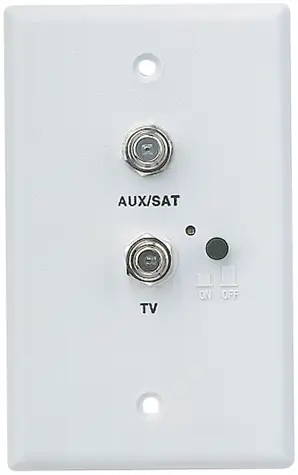
🔴 If the light is ON: You are in "Antenna" mode. Press the button to turn it OFF.
🟢 If the light is OFF: You are in "Cable" mode. This is correct.
Why? If this light is on, your RV ignores the campground cable signal and tries to use your roof antenna instead.
Step 4: TV Channel Scan Instructions
- Turn on your TV.
- Press the "Input" or "Source" button on your remote.
- Select "Cable" or "TV" (Do not select "HDMI" or "Antenna/Air").
- Press the "Menu" or "Settings" button on your remote.
- Navigate to "Channels," "Setup," or "Broadcasting".
- Ensure signal type is set to "Cable" (not "Air").
- Select "Auto Program," "Channel Search," or "Channel Scan".
- Wait for the progress bar to reach 100%.
Troubleshooting Weak Signals
The Booster Light: Double-check Step 3. This is the #1 reason for connection issues. If that tiny LED light is on, you will not get cable channels.
Check the Distribution Box: Many larger RVs have a switch box (often in a cabinet) that routes signals to different TVs. Ensure the button for your TV is set to "Cable" and not "Sat" or "Ant".
Smart TVs (Roku/Samsung/FireTV): The "Channel Scan" menu is often hidden. Look for a "Live TV" app or an "Antenna/Cable" input icon on the home screen to access the menu.
Digital Channel Lineup
| Ch. | Network | Genre |
|---|---|---|
| 202 | WGBH-2 (PBS) | Local |
| 203 | NECN | News |
| 204 | WBZ-4 (CBS) | Local |
| 205 | WCVB-5 (ABC) | Local |
| 206 | WFXT-25 (FOX) | Local |
| 207 | WHDH-7 | Local |
| 208 | WBTS (NBC) | Local |
| 209 | WMUR-9 (ABC) | Local |
| 210 | WLVI-56 (CW) | Local |
| 211 | NHPBS (WENH) | Local |
| 212 | WCSH-6 (NBC) | Local |
| 213 | WGME-13 (CBS) | Local |
| 214 | QVC Plus | Shopping |
| 215 | C-SPAN 2 | News / Gov |
| 216 | HSN | Shopping |
| 217 | True Crime Network | Entertainment |
| 218 | WSBK-38 | Local |
| 219 | Oxygen | Entertainment |
| 220 | Shop LC | Shopping |
| 221 | ION | Local / Variety |
| 222 | C-SPAN | News / Gov |
| 223 | QVC | Shopping |
| 226 | Fox Sports 2 | Sports |
| 228 | ESPN | Sports |
| 229 | ESPN 2 | Sports |
| 230 | NBC Sports Boston | Sports |
| 231 | Golf Channel | Sports |
| 232 | NESN | Sports |
| 233 | Lifetime | Movies & Drama |
| 234 | TBS | Entertainment |
| 235 | E! | Entertainment |
| 236 | FX Movie Channel | Movies |
| 237 | Hallmark Channel | Movies & Family |
| 238 | MTV | Entertainment |
| 239 | VH1 | Entertainment |
| 240 | Great American Family | Lifestyle / Family |
| 241 | CMT | Entertainment |
| 242 | Fox News | News |
| 243 | MSNBC | News |
| 244 | CNBC | News |
| 245 | CNN | News |
| 246 | HLN | News |
| 248 | The Weather Channel | News & Weather |
| 249 | FX | Entertainment |
| 250 | TNT | Entertainment |
| 251 | USA Network | Entertainment |
| 252 | Comedy Central | Entertainment |
| 253 | Paramount Network | Entertainment |
| 254 | Bravo | Entertainment |
| 255 | AMC | Movies & Drama |
| 256 | Syfy | Entertainment |
| 257 | A&E | Entertainment |
| 258 | History | Knowledge |
| 259 | HGTV | Lifestyle & Home |
| 260 | Discovery Channel | Knowledge |
| 261 | TLC | Lifestyle |
| 262 | Animal Planet | Knowledge |
| 263 | TV Land | Retro / Classic |
| 264 | Nickelodeon | Kids |
| 265 | Cartoon Network | Kids |
| 266 | Freeform | Kids & Family |
| 267 | Disney Channel | Kids |
| 268 | Disney Junior | Kids |
| 269 | Food Network | Lifestyle & Food |
| 270 | Travel Channel | Lifestyle |
| 271 | Nat Geo | Knowledge |
| 272 | LMN | Movies |
| 273 | BBC America | Entertainment |
| 274 | BBC World News | News |
| 275 | Hallmark Mystery | Movies |
| 276 | OWN | Lifestyle |
| 278 | NESN Plus | Sports |
| 279 | truTV | Entertainment |
| 280 | Fox Sports 1 | Sports |
| 282 | Invest. Discovery (ID) | Entertainment |
| 284 | NewsNation | News |
| 285 | FXX | Entertainment |
| 286 | Court TV | News / Crime |
| 287 | NHPBS Explore | Local / Educ |
| 288 | NHPBS World | Local / Educ |
| 289 | NHPBS Create | Local / Educ |
| 290 | Cozi TV | Retro / Classic |
| 291 | Buzzr | Retro / Game Shows |
| 292 | LAFF | Retro / Comedy |
| 293 | ION Mystery | Entertainment |
| 294 | Start TV | Retro / Drama |
| 295 | MeTV (WCVB) | Retro / Classic |
| 298 | This TV | Retro / Movies |
| 299 | MeTV (WMUR) | Retro / Classic |